A nice free method how to generate 13K+ Views everyday without paying one buck. Most services are today not so good but give them a try cause it is free. Have fun with the list
1. Vagex: Vagex.com (1500-2200+ views per day)
This site provides you with all sorts of services. Including views, likes, comments and subscribes.They got Auto-earn sistem,so u can easy earn credits.
2. Addmefast.com: Addmefast.com (500-1000+ views per day or 500+ likes)
This site is best for youtube video likes,but u can also get YT views,FB likes and more.Bad thing is that u need to earn manual,they dont have auto-credit earner software.
3. U2BViews: U2bviews.com (1500-2500+ views per day)
They give fast views for little credits. It has un legit and slow comments though. For 1000 credits can get you up to 5k views.Kinda hard to earn credits even with auto-earn software.
4. View2.be: View2.be (2000-3000+ views per day)
This site provides you with all sorts of services. Including views, likes, comments and subscribes. Here u can earn credits realy fast. You got a fast on page script or addon which helps you earn credits
5. Enhanceviews.com: Enhanceviews.com (500-1000+ views per day)
This site is good for everything,got alot of good options.Likes,Views,Comments(Custom comments to) etc.
6.Shareyoutubevideos: Shareyoutubevideos (1500-2200+ views per day)
Here u need to download software and earn free credist(Free users have limited 100-150 credits every 6 h).For 100 credits u will get 300+ views.
7. Hitleap: Hitleap.com (800-1200+ views per day)
This site give only views,and u can earn minutes very fast(u can open 3,4,5 or more tabs and let them earn for you) + u can download software and earn more.
8. LinkCollider: LinkCollider.com (1500-2000+ views per day)
This site is like HitLeap,Websyndic,etc.Here u can earn credits in many ways,auto or manual.Free 1000 tokens every day.
9. Websyndic: Websyndic.com (2500-5000+ views per day)
On this site your Views are delivered very fast,kinda insave fast.And good this is that this site got Auto-Surfer for any Browser without any download.So u can auto-earn credits.
10.EmpireViews: EmpireViews.com (1000-1500+ views per day)
This site i use most,becouse i'm here geting views fast,really really fast,and credit earning sistem is good.You can download viewer or firefox viewer addon,so basically you can auto-earn credits.
If somebody posted this method, I apologize. But the search did not given me some others.
Have a nice day
Romantic - Diary
This is default featured slide 1 title
Go to Blogger edit html and find these sentences.Now replace these sentences with your own descriptions.This theme is Bloggerized by Lasantha Bandara - Premiumbloggertemplates.com.
This is default featured slide 2 title
Go to Blogger edit html and find these sentences.Now replace these sentences with your own descriptions.This theme is Bloggerized by Lasantha Bandara - Premiumbloggertemplates.com.
This is default featured slide 3 title
Go to Blogger edit html and find these sentences.Now replace these sentences with your own descriptions.This theme is Bloggerized by Lasantha Bandara - Premiumbloggertemplates.com.
This is default featured slide 4 title
Go to Blogger edit html and find these sentences.Now replace these sentences with your own descriptions.This theme is Bloggerized by Lasantha Bandara - Premiumbloggertemplates.com.
This is default featured slide 5 title
Go to Blogger edit html and find these sentences.Now replace these sentences with your own descriptions.This theme is Bloggerized by Lasantha Bandara - Premiumbloggertemplates.com.
Wednesday, 2 March 2016
Facebook Pages Status
- Khabi Khabii Unsay Shikayat Karnay Say Behtar Khamosh Rehnaa e Achaa Haii Kyun K Jab Fark e Nahii Parhtaa Tou Shikayat Kesii ?? :')
- Jab say Tum Meri Zindagi Say aag Howay hO Tab say Na Battery Down Howi Hai Or Na e Balance Khatam Howa Haii :D :p
- Aghar Apni Ghar Kii IZzaat Mehfooz Karnaa Chahtay HOo tou Dosroo Ki Ghar ki Izaa Khaabi Kharab Maat Karnaa :')
- No Matter how far your mather is, if she recites Ayat - ul - kursi and blows on yu in her imagination that blow will reach you <3
Monday, 8 February 2016
How To Get 1,000k Point On ADDMEFAST
AddMeFast
Creat Your Account in AddmeFast For Creating Account Click Here
After Creating Your Account Now Add Your Site , on whihc yo Wanna Likes , Subscribers or Followers etc
Set The CPC 9 For Getting Likes Back Fast And Save It..
Yes You Are Done And AddMeFast Awarded you 50 Points For Registration And They Will Provide 200 Points as a Bonus For 50 Clicks
Now you Wanna More points?
For More Points ( 10,000k ) Click Here ( Note : Use USA Ip Address For Surveys ) For Use IP Address Download Zenmate Extension For Chrome
Click on 1 Million Points And They Will give you a SHort Survey complete The survey through USA ip Address And you Will Get 10,000,000 Points
AddMeFast is The Popular Site Which is Use For Exchange Of Facebook Youtube Instagram And Many More Social Networks
Steps To Get 10,00k Poiunts On AddMeFast :
Step # 1:
Creat Your Account in AddmeFast For Creating Account Click Here
Step # 2 :
After Creating Your Account Now Add Your Site , on whihc yo Wanna Likes , Subscribers or Followers etc
Step # 3
Set The CPC 9 For Getting Likes Back Fast And Save It..
Yes You Are Done And AddMeFast Awarded you 50 Points For Registration And They Will Provide 200 Points as a Bonus For 50 Clicks
Now you Wanna More points?
Step # 4
For More Points ( 10,000k ) Click Here ( Note : Use USA Ip Address For Surveys ) For Use IP Address Download Zenmate Extension For Chrome
Step # 5
Click on 1 Million Points And They Will give you a SHort Survey complete The survey through USA ip Address And you Will Get 10,000,000 Points
If You Have Any Question Then Comment Below The Post :)
Saturday, 6 February 2016
How To Change Facebook Page Name By Half Trick
Steps To Change Facebook Fan Page Name By Half Trick
1. Go To Your Page
2. Open Your Page About Section
3. Now Change The Half Name of Your Page For Example i want to change the Romantic - Diary Name to Sab Logo Ki Baatien , First Change the half name of your page i.e Sab Logo ki - Diary
4. Now Wait For Facebook reply When They Change The Half Name Successfully Then Wait For 2 3 Days to save page from unpublish.
5. After 3 Days Now Change The Other Half Name of Your Page To Your Desired Name Sab Logo Ki Diary To Sab Logo Ki Baatien.
6. Now Wait For Facebook Reply And Here is Your Facebook Fanpage Name Change :')
Thanks For Watching , Dont Forget To Like And COment :)
Sunday, 31 January 2016
GET 1000 VEIWS ON YOUTUBE VIDEO , BLOG OR WEBSITE.
STEPS TO GET 1000 VIEWS ON A YOUTUBE VIDEO , BLOG OR WEBSITE. :
1. GO TO HITLEAP WEBSITE i.e www.hitleap.com
2. CREATE ACCOUNT IN HITLEAP.
3. NOW LOG IN AND DOWNLOAD A HITLEAP SOFTWARE FROM HITLEAP WEBSITE.
5. NOW INSTALL THE HITLEAP SOFTWARE AND SIGN IN IN SOFTWARE .
6. NOW WAIT FOR 3 HOURS AND GET 1000 VEIWS
NOTE : DONT CLOSE THE WINDOW OF HITLEAP SOFTWARE
Saturday, 30 January 2016
Koi Mujey Pyar Nahe Karta :(
KOI MUJHEY PYAAR NAHEE KARTA
MUST WATCH THIS AWESOME VEDIO
LIKE , COMENT AND SHARE :)
Thursday, 28 January 2016
How To Disable/Hide Seen On Facebook Chat/Messages – 2016
#1 Method To Disable Seen Option on Facebook Chat Automatically
Note:- This method is working only on Web version and only on the same device where you will install below given extension according to browser type.
- First of all install Below given extension.
For Mozilla Firefox Visit HereFor Google Chrome Visit Here
- Choose and install above given extension according to browser type.
- After installing extension restart your browser.
- Now Login your Facebook account on that browser Seen option will not visible to your friends while doing chatting.
How To Check Extension Is Working Or Not ?
- Whenever someone send you a message simply reply or read that message. After reading visit to Message Box from Icon visible in navigation bar of Facebook.
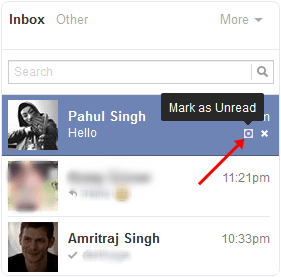
- Now Checkout the color of that person message in inbox if the color visible is dark blue as compare to other messages after reading Or just reload Facebook if the Mark as Read option is visible then extension is working.
How to Disable Seen Extension ?
- In case you want to stop feature. Simply go to Add-one option in Firefox or extension option in chrome.
- Click on the disable or remove button visible in front extension we had installed.
2nd Method To Disable Seen Option in Facebook Chat (Manually)
This is simple process almost every knows. In case you don’t then must read about it.
- If you don’t want to install any kind of extension then the option available for you is, by it doing manually.
- To do this when someone send you a message then go to inbox area >> Read the message >> After that click Mark as unread option.
- Now for each person where you want to hide seen option.. Every time you have to click on Mark as unread option after reading his or her message.
According to me if you really get irritate from messages then installing an extension is a good idea. If you like this trick and find working and useful must share it with others. In case you face any kind of issue feel free to ask in comments.
Wednesday, 27 January 2016
Facebook Fan Page Manual Verification Process
If you believe that your page should matches with Facebook verification terms but you are not able to get verified automatically then only way to get your page verified is manually process. But According to Facebook they are not accepting Request for verified publicly.
Yes its true Facebook is not accepting request from audience but through Agencies, PMD’s or other networks agents which who are dealing for verification. So to get verified you have to contact any agency for verification then they will charge their fee and do all process for manual verification.But recently Facebook Update Form to submit request for manual verification. Just need to select your page and your ID proof. If your page will be eligible then Facebook will accept your page verify it.
Open this Verification form from that account in you which are Admin of that particular page. You will receive response via email from Facebook within 24-48 hours.
Documents For Verification
- If Your Page is about any Celebrity, Artist, journalist or about any famous personality Facebook need Government proof of that person. Acceptable documents are Passport, License or other of same person.
- If Your Page is about brand then you have provide various kind of document which we will discuss via email.
What Pages are not Acceptable ?
Pages which are based on
Website, Blogs, Business, Locations, communities and many more which are not acceptable. If you have Facebook page of this type then sorry your will not verified until Facebook start verification for these sectors.
Conclusion ?
Facebook do automatic verification for big pages detected by their Algorithm and also accept manual verification not directly. So don’t worry about anything just contact us we will do it for you at low cost as much as we can. In case we will not able to do verification we will refund all the amount you have paid.
How To Verify Your Facebook Page or Profile ? [Submit Request]
Facebook recently introduce new feature to show that a page or profile is verified or not. As a normal Facebook user we all create account or page with our name and it is also possible to create multiple account on same name. Their are number of same name pages or account for any celebrity, public figure or for any business. So Facebook take serious step to make clear that which one is official and all the rest of others are not. This verification show that the page or profile your are visiting official represent someone or maybe a property of anybody. Facebook verify pages according to there online and offline presence. If you are real famous personally and well known by public then it will be very easy. Facebook verify pages for celebrities and public figures easily as compare to brand, websites based pages. So verification is just depend on our luck and popularity. For any famous celebrity you can’t get his or her page verified until you are authorized representative or that celebrity manually submit request. So in this topic i will explain you both method for Automatic process and manual process and i hope this help you to understand in best way about verification.
What Is Verified Facebook Profile Or Page ?
According to this new option some pages and Profiles are claim as Official and verified by Facebook. You may observe on many profiles and pages their is Blue Color Tick Badge just in the next of name.
Facebook only four type of pages or profiles which are
- Celebrities
- Journalists
- Government Officials
- Popular Brand or Businesses
These are four categories whose pages and profiles are claimed by Facebook based on their popular. Suppose if you have any local business which is popular then Facebook may claimed your page if you are official representative. Then their is no need to submit any type of request to Facebook. They automatically claim your page as verified depend on some details and minimum requirements mention by Facebook.
How To Get Facebook Page Verified ?
If your profile or any Page whose your are official representative and also based on above mention categories then their are chances of your page to get verified. Actually Facebook does not have any request form to claim verified this is totally automatic process done from Facebook side. So to become verified in future you should have to do some changes in your Profile or Page
- Your page should be official represent your local business or any personality and may be have some popularity on Facebook.
For Facebook claiming process your page or profile must have minimum details because if you add full details accurately then Facebook automatically check your provided information if they find your page or profile details accurate and helpful then verify your page here are two parts mention by Facebook to become verified
- Link To Your Profile or Page From Official Website and also link website on your page or profile.
- Provide accurate information in details about your business in About Section of Page or Profile
In About section must add significant long and short description, keyword who represent your business, Email, Website, Products and verified page location with claimed business address and other details in Page Info tab. Just for example as shown below
These are some tips which help you to get verified if your profile or page is official. Facebook don’t guaranteed about all pages to get verified because its totally depend on Popularity and accuracy. So add all information and wait until page processed your profile or page to make you verify. According to me it takes almost 40-50 days after adding info to get verify if Facebook approved your account or page.
Submit Request For Verification Manually
Recently Facebook update the latest for submit request for verification badge. As many users are cheated by fake agents and agencies so finally Facebook decide to introduce a request form for normal users to submit request for verification. To submit request manually visit below given form
Open this form from that account in which are admin of that or in that account which authorized representative of that person.
Simply select the page and upload ID proof and verification letter official signed by Celebrity.
Pages of Celebrities and Public figures are currently accepted. Business and websites based pages are not accepted.
Your will receive an email from Facebook team regarding verification. It takes around 24-48 hour about your page status.
For more details checkout below given article. If you will help you to understand more about verification.
Check out:- Submit Facebook Page Request For Verification
I hope you learn something new in this article to make your business or powerful and trusted on Facebook also. If you have any question feel free to share your comment.
How To Increase Twitter Followers 2016
How to Increase Twitter followers
Here is a list of websites where you can get free twitter followers.
1) 500followers.com: 500followers.com is a great website to increase twitter followers instantly, to get twitter followers all you need to do is, just go to 500followers.com and login using your twitter account. Now follow some of their sponsors to earn quick points. If you follow one sponsor then you will get 5 points which is equals to 5 followers. Apart from this, you will also get 20 bonus points daily.
2) twimod.com: You can get targeted real twitter followers using this site. Login this site with your twitter account and follow other people to get mods and convert mods into real followers. Twimod accepts only real profiles to their site; every twitter account should have a profile picture, biography, least 25 followers and least 100 tweets to get approved into their network.
3) jetfollowers.com: This site gives you 20 points daily and you can invest these 20 points to get 20 followers daily without doing anything. To get free 20 followers daily login to jetfollowers.com using your twitter account and increase your twitter followers fast.
4) 30followers.com : This website exactly works same as jetfollowers.com and you will get 20 free points daily. You can spend these 20 points to get 20 twitter followers.
5) 300followers.com : Again, another clone of jetfollowers and 30followers to get 20 free twitter followers daily.
6) twiends.com : Twiends is a follower exchange network, where you can follow other people to earn seeds then you can invest those seeds to increase your twitter followers. You can get unlimited twitter followers on Twiends, all you need is seeds and you have to follow other people inorder to earn seeds.
7) Addmefast.com : Addmefast is another alternative of twiends to increase twitter followers. You can earn addmefast points by various ways and you can invest those addmefast points to get twitter followers.
Most of the times, when you use above mentioned website, you follow other people unintentionally. I wrote an article on how to unfollow everyone on twitter in a single click; I hope you will find that article helpful to unfollow people from your twitter account fast.
So, here comes the end of article on “How to increase twitter followers”. If you use above mentioned websites regularly then you will surly increase your twitter followers by 500-800 daily.
5) 300followers.com : Again, another clone of jetfollowers and 30followers to get 20 free twitter followers daily.
6) twiends.com : Twiends is a follower exchange network, where you can follow other people to earn seeds then you can invest those seeds to increase your twitter followers. You can get unlimited twitter followers on Twiends, all you need is seeds and you have to follow other people inorder to earn seeds.
7) Addmefast.com : Addmefast is another alternative of twiends to increase twitter followers. You can earn addmefast points by various ways and you can invest those addmefast points to get twitter followers.
Most of the times, when you use above mentioned website, you follow other people unintentionally. I wrote an article on how to unfollow everyone on twitter in a single click; I hope you will find that article helpful to unfollow people from your twitter account fast.
So, here comes the end of article on “How to increase twitter followers”. If you use above mentioned websites regularly then you will surly increase your twitter followers by 500-800 daily.
Tuesday, 26 January 2016
How To Verify Facebook Account 2016
Facebook Account Verification:
EveryOne Want To Verify Their Account Which Can Never Be Blocked
By Report Or Anything Else , So Here i Wanna Share The Trick Of
Account Verification.
Block Id Verification By Id Card
Acceptable IDs include your:
- Passport
- Driver's licence
- State-issued ID card
- Military ID card
- Immigration ID with signature
These Are The Cards Through Which You Can Verify Your Facebook Account , Now Steps are
1. Edit One Card. Just Remove The Name And DOB ( Date Of Birth) From The ID Card.2. Now Submit Your Facebook Name Means That Name Which You Wana Verify And Give The Date of Birth Which Is On Facebook.3. Now Submit This Card To Facebook And After 24 Hours Your Account Will Be Verify .
Dont Forget To Like Comment And Share :)
Allah Hafiz
Acceptable IDs include your:
- Passport
- Driver's licence
- State-issued ID card
- Military ID card
- Immigration ID with signature
Delete All Facebook Group Trick 2016
How to delete leave all Facebook Group on one click 2016 -
There is no software for this, but you can this using macros extensions in Mozilla Firefox. Macros are simple also very useful extension for Firefox its is also working in Google Chrome just install and add a script which i provide you in below tool. Ok has now followed me to leave or delete all.
- First, you must log into Facebook with remember me.
- Open your Firefox and Install Imacros.
- Now restart your browser if required.
- Now go on or Search This Below Folder
- There you create a folder and paste script below.
- Now click on the right side imacros symbol.
- Now you will see a left side box containing scripts.
- Click on a script and wait for few minutes.
- Then you will see your group one by one leaving.
- Now it’s done, its depend on your net speed,
iMacros script For delete all Facebook Group
VERSION BUILD=6111228 RECORDER=FX TAB T=1 SET<span id=”76789be8-6a77-46b1-bd38-4c43255f2e54″ ginger_software_uiphrasegu> !</span>ERRORIGNORE <span id=”e9046da2-93f2-4717-9176-3cb91527d7ea” ginger_software_uiphrasegu>YES SET</span><span id=”da2c4bd7-c8cf-4ba4-9818-79ce1613e11b” ginger_software_uiphrasegu> !</span>TIMEOUT 100 SET<span id=”186b5e22-60df-4964-8112-2283d3fc6e61″ ginger_software_uiphrasegu> !</span>DIALOGMANAGER NO TAG POS=1 TYPE=A ATTR=TXT:LeaveGroup TAG POS=1 TYPE=INPUT:BUTTON ATTR=NAME:remove&&VALUE:Remove WAIT SECONDS=2 –
12 Things to Do Before Applying for Google AdSense
1. Privacy Policy :
One of the common mistakes that every bloggers and I made many times before getting approved. Even though there are people out there who say that having a privacy policy for a Blog doesn’t makes sense but they are wrong!
The first thing you will need to apply for Google AdSense and get approval is the privacy policy of your blog or website. If you don’t have it you cannot get approval simple is that. Why it is important? Because this privacy policy means you are not a scam and gives the sense of a serious business. Google will check the rest of the conditions only if you have this policy.
A privacy actually describes to your readers about what they will get on your Blog , what they should do and what they should not. So obviously there is nothing bad in having a privacy policy. While it can affect somehow on your AdSense Approval, you must give it a try. You can write it yourself or find Privacy Policy Generators online (You don’t need a lawyer anyway).
2. About Page:
Like privacy policy you must have a about page so that you can get approved. Like privacy policy this About page also give the sense of a serious business.
An About has major role and importance if you don’t want to apply for AdSense. But when it comes to AdSense, they are about zero chances of getting approved if you are not showing this page.About page simply describes about you and your Blog . This will not only help you establish a relationship with readers but it will also make them trust upon you.
3. Contact Us Page:
It’s quite obvious that everyone has his/her own opinion. What one of your readers likes may be bothering someone else. Than it is better to give them opportunity to speak up to you and tell how they feel about your Blog, what they want to be edited , what they liked or hated.
Create a contact us page, if possible add your professional email there like info@yourblog.com and your social profile links too. Bcreating this you are telling Google that see we care for our customers, visitors and we are ready to help them. They can contact us any time.
It will also show the Google AdSense Team that is viewing your site that you actually care about your readers and not only the money and AdSense.
I’d recommend you to check my contact page to get some idea.
4. Name/ Email Verification:
When you apply don’t forget to put your Name and Email address in some easily visible area like About Me and Contact Us pages. It will confirm to Google AdSense Team that it is the same person who applied for AdSense and not some spam, crappy bots. This will help the Google in the verification process.
5. Age Verification:
This is the mistake that most younger blogger are making who are less than 18. They write incorrect age and get into trouble.
Use your correct date of birth and age while applying for Google AdSense account.
Because Google AdSense is not for people who are under 18. Some people realize this problem after being disproved a few times without any legitimate reason. So I advise you to be accurate while typing your age. Be honest.
6. Minimum Number of Posts:
What should be the minimum number of posts before applying for Google AdSense? There is no confirmed answer.
Not even one.
Because I have seen very established Blogs with 400+ posts and their owner telling me that Google AdSense is rejecting them while somewhere bloggers with 40,50 posts are enjoying making money.
Exactly, what I said that there is no actual answer. However, we can always predict things. According to my experience, you should only apply after you have more than 50 posts. Posts length must be 500+ words too with quality content.
7. Design:
As mentioned earlier, you blog design matters a lot. It should be professional and not like a messy photo gallery. Clean, professional and smart design is appreciated by Google.
Your blog design is the biggest thing after Content. This represents your expertise, experience and professionalism. So be careful because anything can kill your chances of getting approved by AdSense. I recommend Elegant Themes because you get access to 87 WordPress themes in just $69.
8. Content Type:
Be careful with what type of content you are publishing. Because it is something that truly matters.
Google AdSense is not for pornographic, pirated content, illegal items, drugs or other blogs /sSites like that. AdSense team won’t be willing to allow you to step in if you own a Non English Blog. Having posts shorter than 200 words in length is also Red Signal.
9. Providing Value:
Google loves the blog who are providing value in their content and their visitors and customers are enjoying that value. Be sincere with your visitors don’t ever try to scam them instead provide value.
Don’t complain about not making money and don’t clearly state that you’re blogging for money only and have no other interest in it. Because this will show them that you will not be providing values to your readers any day. Hence another Red Light glows up.
10. Top Level Domain:
Those days are gone far away when AdSense used to approve “Blogspot” and “WordPress.com” Blogs. As for today, you must have your own unique domain that specifies your Blog. If you don’t have one yet, stop dreaming about getting approved with Sub domains and go buy a Top Level Domain.
When it comes to domain, your domain should be of top level. For this purpose the best domain is .com domain. Choose a short, unique and easy to remember domain related to your blog niche.
Another important thing about domain is it’s age. Because most of Asian Countries, AdSense has placed an age restriction. They don’t accept any sites which are not 6 months old.
So keep it in mind before applying for Google AdSense program.
11. Other Ad Networks:
If you have any other Ads placed like Chitika, Clicksor or anything, it’s time to drop them off.
Even Google AdSense allows you to use other Ad Networks along with them, it’s better to remove the ads before Applying and don’t put them back until you get a reply from AdSense Team.
So, before submitting your application for Google AdSense make sure to remove all the ads on your blog from any other network.
12. Paid Traffic:
Google hates the sites that are getting paid traffic and mostly penalizes them so there is not a damn chance of getting approved by AdSense for a site that is getting paid traffic. You can bring traffic from Search Engines or any other way you want but if you want to earn via Google AdSense the right way, paid traffic is not a solution.
Also note, that Google do not accept site which gets traffic from illegal sources. So focus on getting traffic from legal sources like social media, SEO and related blogs.
What to do if AdSense is not getting approved?
After all this what if Google AdSense does not approved you?
It’s not the end of the world! 
There are many other trusted and high paying ads network you can use and trust me they are not hard as Google AdSense is in terms of getting approval. One door of opportunity is closed so the other one will open.
You can use these ad networks to earn money without AdSense. They are easy to get approved.
Infolinks is the leader in in-text advertising which offers 70% revenue share even if you’re a newbie blogger. It is different from other advertising networks. It takes less space because it shows in text ads or pop up ads. You can use it with Adsense safely.
It is a pay per click. They offer advertising options like: insearch ads, intext ads, inframe ads, intag ads.
- Alexa Rank: 2571
- Min payout: $50
- Payment method: PayPal, Wire Transfer, eCheck, Western Union, Payoneer
Media.net is probably the best alternative to AdSense as it’s powered by Yahoo Bing Network. I’ve tried Media.net year ago and the average CPM was much better than any other AdSense alternatives.Media.net ads are quite similar to Google AdSense and it’s very easy to get approved if you’ve a quality blog.
- Alexa Rank: 5132
- Min payout: $100
- Payment Method: PayPal, Bankwire
BidVertiser is another top alternative to Google AdSense which pays you for valid clicks on ads placed on your website. It is great Adsense alternative if you didn’t get Adsense approval or got banned. Bidvertiser offers Banner ads, Text ads, Mobile Ads, Slider ads etc. You can also make money by promoting your customized toolbar.
- Alexa Rank: 892
- Min payout: $10 only
- Payment Method: PayPal, Checks
Chitika is a CPC program. Chitika is very similar to Adsense. It shows relevant ads based on your content. You can easily customize ad color, URL color, border color to match your theme tone. You can also choose for their referral /affiliate program, to earn extra income.
It offers 3 types of ads – Search Targeted Ads, Local Ads and Mobile Ads.
- Alexa Rank: 5520
- Min payout: $10
- Payment Method: PayPal, Check